
AccessAlly provides native affiliate tracking and management for Kit users, eliminating the need for third-party integrations or separate affiliate plugins.
ARTICLE CONTENT:
What This Integration Supports
AccessAlly’s affiliate functionality works with:
- Online courses
- Digital products
- Membership programs
- Recurring subscriptions
- Events
Prerequisites
- Active AccessAlly plugin installation
- Paid Kit account with API access
- AccessAlly-Kit integration configured via Setup Wizard
Setup Steps
1. Configure Kit Integration
Add your Kit API credentials in the AccessAlly Setup Wizard to establish the connection between your WordPress site and Kit account.
2. Create Your Offering
Create offerings in AccessAlly for the products or services you want to include in your affiliate program. AccessAlly supports single payments, payment plans, recurring subscriptions, and promotional pricing.
3. Design Order Forms
AccessAlly’s 3-step order forms capture contact information on the first page, allowing abandoned cart follow-up through Kit automations.
Affiliate Center Offering Access
Affiliates access their dashboard on your WordPress site where they can:
- Generate affiliate links for specific products
- View real-time sales reports
- Track traffic sources and link performance
- Monitor commission earnings
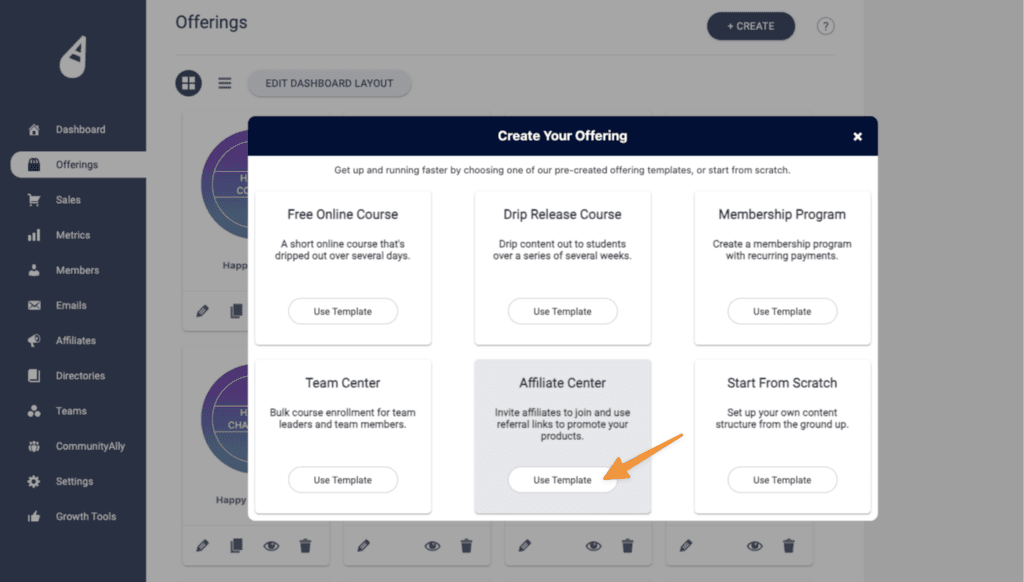
AccessAlly provides an Affiliate Center Offering Template for creating a branded affiliate portal.
Affiliate Commission Settings
Configure these items in AccessAlly > Affiliates tab:
- Commission percentage or fixed amount
- Cookie tracking duration
- Recurring commission settings (for subscription products)
- Multi-tier affiliate structures (if using level 2 commissions)
Assigning Affiliate Status
Affiliates are identified by Kit tags. When a contact fills out your Affiliate Center Offering form, the designated affiliate tag in applied in Kit and AccessAlly:
- Creates an affiliate account
- Grants access to the affiliate center
- Begins tracking their referrals
- Send Affiliate Welcome Email from your Kit account.
To set this up: Configure your Affiliate Welcome Delivery automation in Kit.
Course and Product Delivery
Course and membership content delivery is controlled by Kit tags and your AccessAlly Offering (for your Course or Membership):
- Configure tag-based access in AccessAlly
- Set up drip schedules in Kit automations
- Kit applies tags based on your automation rules
- AccessAlly displays content when users have the appropriate tags
This works for:
- Instant access delivery
- Dripped content release (daily, weekly, monthly)
- Membership tiers
- Course modules
Real-Time Affiliate Reporting Features
AccessAlly tracks:
- Which affiliates are generating traffic
- Source pages where affiliate links are clicked
- Individual affiliate earnings
Reports update in real-time as transactions occur.
